Automate Your Digital Signage & Media Playback with Smart Scheduler Pro

Professional Windows software for scheduled video playback, automated school bell systems, retail background music, and emergency broadcast solutions.

Automated Scheduling Digital Signage Emergency Broadcast Video Playlists Background Music Multi-Format Support
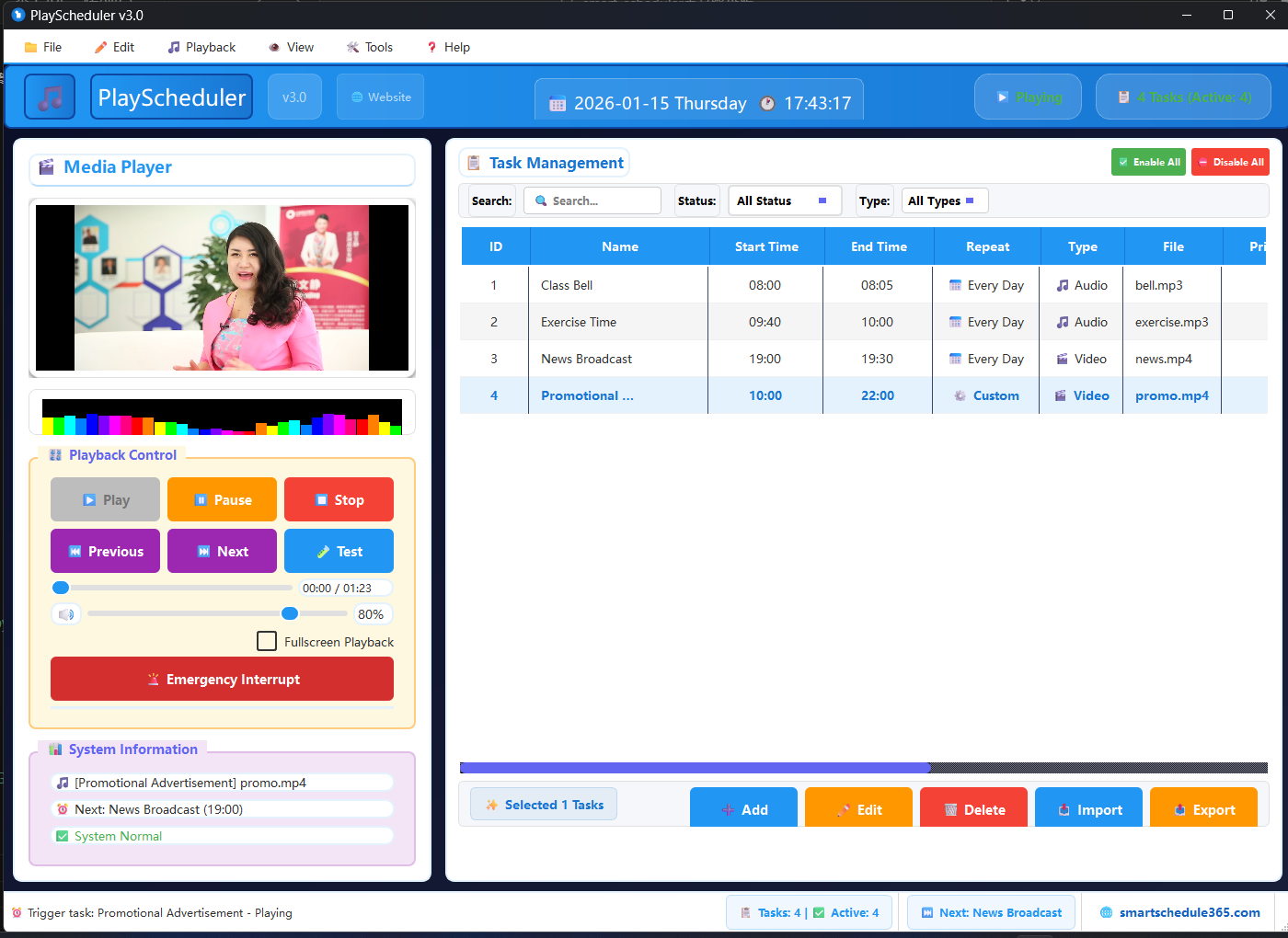
Smart Scheduler Pro digital signage software interface on computer screen

Professional Digital Signage Features

Powerful scheduling and playback capabilities for Windows-based digital signage systems

Advanced Scheduling

Create precise daily, weekly, or custom playback schedules for unattended operation. Perfect for automated school bells and retail hours.

  • Complex time-based scheduling
  • Holiday and exception rules
  • Multiple timezone support
  • Recurring and one-time events

Universal Media Support

Play videos, audio files, images, live streams, and PowerPoint presentations. Supports all major formats and codecs.

  • MP4, AVI, MOV, MP3, WAV
  • YouTube, Vimeo, live streams
  • Image slideshows (JPG, PNG)
  • PowerPoint presentations

Digital Signage Ready

Optimized for digital displays, kiosks, and multi-screen setups. Full-screen playback with no distractions.

  • Multi-monitor support
  • 4K and HD playback
  • Portrait and landscape modes
  • Remote content management

Emergency Broadcast

Immediately interrupt scheduled content with emergency alerts, safety messages, or important announcements.

  • Priority override system
  • Pre-recorded emergency messages
  • Automatic resume after alert
  • Remote trigger capability

Background Music System

Perfect for retail stores, restaurants, and offices. Schedule music by time of day, day of week, or special events.

  • Volume normalization
  • Crossfade between tracks
  • Zone-based audio control
  • Royalty-free music library

School Bell & PA System

Automate school bells, class changes, announcements, and emergency drills with precision timing.

  • Period-based scheduling
  • Different schedules by day
  • Special event overrides
  • Fire drill integration
Try All Features Free for 30 Days

Industry Applications

Used by organizations worldwide for reliable media scheduling and playback

Education
Retail & Hospitality
Corporate
Healthcare

School & University Digital Signage Solutions

Smart Scheduler Pro is the perfect solution for educational institutions needing reliable automated bell systems, campus-wide announcements, and digital signage for wayfinding and information dissemination.

  • Automated Bell Systems: Replace manual bell ringing with precise automated scheduling
  • Campus Digital Signage: Display announcements, events, and emergency alerts on screens throughout campus
  • Classroom Media: Schedule educational videos and presentations to play automatically during class time
  • Emergency Preparedness: Instantly broadcast lockdown procedures or safety announcements
  • Sports Facilities: Control scoreboards, play background music, and make announcements in gyms and stadiums
  • Library Systems: Quiet hours announcements and event notifications

SEO Keywords: school bell system software, campus digital signage, automated school bell, classroom media player, educational technology software, school PA system automation

Download Education Edition Trial

Trusted by Organizations Worldwide

See what our customers say about Smart Scheduler Pro

"We replaced our old bell system with Smart Scheduler Pro and it's been flawless. The automated scheduling has saved us countless hours and the emergency broadcast feature gives us peace of mind."

MJ

Michael Johnson

IT Director, Springfield High School

"Our retail chain uses Smart Scheduler Pro in all 12 locations. The background music scheduling by time of day has improved customer experience, and the promotional video loops have increased sales."

SR

Sarah Roberts

Operations Manager, Urban Retail Group

"As a corporate communications manager, I need reliable digital signage across our offices. Smart Scheduler Pro handles everything from daily news feeds to emergency announcements seamlessly."

DC

David Chen

Communications Director, TechGlobal Inc.

Ready to Automate Your Media Playback?

Download the 30-day free trial with all features included. No credit card required. See how Smart Scheduler Pro can transform your digital signage and scheduling needs.

System Requirements: Windows 10/11, 4GB RAM, 500MB disk space

Frequently Asked Questions

Find answers to common questions about Smart Scheduler Pro

Can Smart Scheduler Pro replace our school bell system?

Yes, absolutely. Smart Scheduler Pro is widely used as an automated school bell system. You can schedule different bells for different periods, days, and even create special schedules for exams or events. The software provides precise timing and reliable operation.

How does the emergency broadcast feature work?

The emergency broadcast feature allows you to immediately interrupt any scheduled content with a priority message. You can trigger it manually from the software interface, via a hotkey, or remotely through network commands. After the emergency message plays, the system automatically returns to the scheduled content.

What media formats does the software support?

Smart Scheduler Pro supports all major media formats: Video (MP4, AVI, MOV, WMV), Audio (MP3, WAV, AAC, FLAC), Images (JPG, PNG, GIF), and live streams (RTMP, HLS). It also supports PowerPoint presentations and PDF files for digital signage applications.

Is internet connection required for the software to work?

No, once installed and activated, Smart Scheduler Pro works completely offline. All scheduling and playback is handled locally on your Windows PC. Internet is only required for software updates, live stream playback, or if you're using cloud-based content management.

What does the lifetime license include?

The $84 lifetime license includes: Permanent use of Smart Scheduler Pro on one computer, free minor updates (version 2.x), one year of premium support, and the ability to reinstall on the same computer. Major version upgrades (e.g., 3.0) may require an upgrade fee at a discounted rate.